Your App Is One Slow API Away from Disaster — Here's How to Fix That
Imagine you’re at a restaurant. You order, the waiter disappears into the kitchen, and… nothing. Five minutes. Ten. Twenty. You’re just sitting there, waiting. Meanwhile, new customers keep filing in, ordering, and they’re also waiting. The kitchen is overwhelmed. The waiter never comes back. The whole restaurant grinds to a halt — not because the food was bad, but because nobody had a plan for when things got slow.
This is exactly what happens to modern apps every day. And it’s 100% preventable.
In this post, I’ll walk you through three patterns that every production system should have — timeouts, retries, and circuit breakers — using everyday analogies so the concepts actually stick.
The Domino Problem
Modern apps rarely do just one thing. When you open a food delivery app and tap “Find restaurants,” your phone talks to a server, which talks to a location service, which talks to a database, which calls a pricing engine, which… you get the idea.
Each of those calls is a potential failure point.

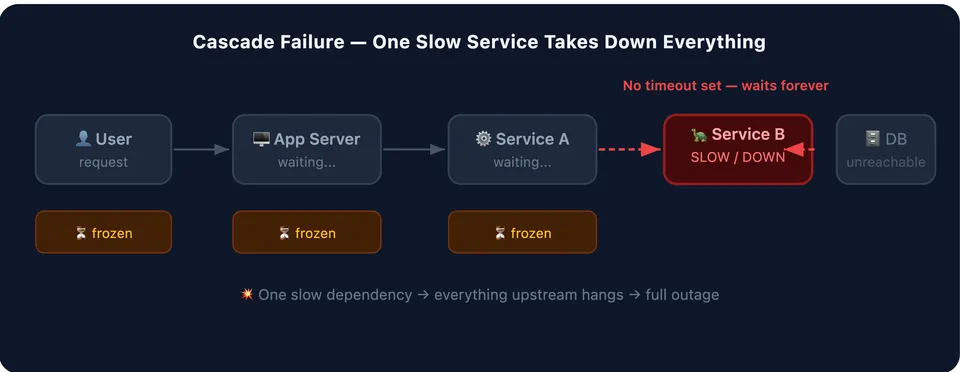
Here’s the scary part: a slow service is often worse than a broken one. If a service is completely down, your app knows instantly — “connection refused” — and can respond accordingly. But if a service is slow, your app just… waits. And while it waits, it’s holding onto memory, connections, and threads. More requests pile up. They all wait too. Eventually your app runs out of resources — and now it looks broken to everyone upstream.
This is called a cascade failure, and it’s one of the most common causes of outages in large systems.
The three patterns below are your defense.
Pattern 1: Timeouts — “I’ll Wait, But Not Forever”
You’re waiting for a friend at a coffee shop. You’d wait 10 minutes — reasonable. You wouldn’t wait 3 hours. At some point you check your phone, realize something must have come up, and leave.
That’s a timeout.
How It Works
A timeout is just a rule: “If this operation doesn’t finish within X seconds, give up and move on.”
Without timeouts, your app could wait forever — or close enough to forever that it amounts to the same thing

Two Kinds of Timeouts to Know
Connection timeout — How long to wait just to reach the other service. Like how long you’ll wait for the phone to ring before deciding no one’s answering. Usually short: 1–2 seconds.
Read timeout — How long to wait for the response after you’ve connected. Like how long you’ll stay on hold after someone picks up. Depends on what you’re asking for.
The Senior Engineer Twist
Here’s what junior engineers often get wrong: they set timeouts that are way too long. “Just to be safe,” they set a 30-second timeout on a call that should take 200 milliseconds.
That’s not safe — that’s 30 seconds of your app being frozen waiting for an answer that’ll never come. Your timeout should be set based on what’s normal for that service, with a little headroom. Not based on what the theoretical maximum could ever be.
Rule of thumb: If a call normally takes 200ms, your timeout should be around 500–800ms. Not 30 seconds.
Pattern 2: Retries — “Let Me Try That Again”
Your phone call drops mid-conversation. What do you do? You call back. Once. Maybe twice. But you don’t redial 20 times in a row the moment it drops — that would be annoying, and the other person is probably trying to call you too.
That’s the philosophy behind retries: try again, but be smart about it.
How It Works
Some failures are temporary. A server hiccupped. A network packet got lost. A service restarted. If you try again a moment later, it works fine.
Retries take advantage of this. Instead of giving up on the first failure, you try a few more times.
But here’s the catch: if 10,000 users all hit an error at the same moment and immediately retry at the same moment, you’ve just tripled your traffic on a service that’s already struggling. This is called a thundering herd, and retries can cause it.
The Solution: Exponential Backoff with Jitter
This sounds fancy. It isn’t.
Exponential backoff means each retry waits longer than the last. Wait 1 second, then 2, then 4, then 8. Give the struggling service room to breathe.
Jitter means adding a little randomness to each wait. Instead of everyone waiting exactly 2 seconds for their second retry, they each wait somewhere between 0 and 2 seconds.

Think of it like leaving a stadium after a big game. If everyone tries to walk out the main exit at exactly the same second, it’s a crush. But if each person naturally varies by a few seconds — tying their shoes, grabbing a jacket — the crowd flows smoothly.
What NOT to Retry
This is where most people trip up: not every failure should be retried.
| Situation | Retry? | Why |
|---|---|---|
| Network blip, 503 Service Unavailable | ✅ Yes | Temporary, likely resolves |
| 404 Not Found | ❌ No | The thing doesn’t exist—retrying won’t change that. |
| 400 Bad Request | ❌ No | Your request is wrong—retrying sends the same wrong request. |
| Payment processed, got a timeout | ⚠️ Careful | Did it go through? You might charge twice. |
That last one is why idempotency matters — designing operations so they’re safe to repeat. But that’s a whole other post.
Pattern 3: Circuit Breakers — “Okay, That’s Enough”
Look at any electrical panel in a house or office. See those switches? Those are circuit breakers.
When there’s a power surge or short circuit, the breaker trips — it cuts power to that circuit to protect your appliances and wiring from damage. Your lights go out, yes, but your refrigerator doesn’t explode.
Once the problem is fixed, you flip the breaker back on.
Software circuit breakers work exactly the same way — but instead of protecting your fridge from a power surge, they protect your app from a failing dependency.
How It Works: Three States
A software circuit breaker has three states:

CLOSED (Normal): Everything is working. Requests flow through. The breaker is silently counting failures in the background — but as long as things mostly work, it stays out of the way.
OPEN (Tripped): Too many failures happened too fast. The breaker trips. Now, instead of sending requests to the broken service and waiting for them to fail, the circuit breaker says “don’t even bother” and immediately returns an error (or a fallback response). No network call made. No waiting.
This is crucial: it gives the broken service time to recover without being bombarded by a flood of requests while it’s trying to get back on its feet.
HALF-OPEN (Testing the waters): After some time has passed, the breaker thinks “maybe it’s better now?” It lets one request through as a probe. If that request succeeds — great, flip back to CLOSED, everything’s normal. If it fails — stay OPEN, keep waiting.
Remember our restaurant from the intro? Here’s what circuit breakers, timeouts, and retries look like in that world:
-
Timeout: “I’ll wait 10 minutes for my food. If it’s not here by then, I’m leaving.”
-
Retry: “My first waiter disappeared. Let me try flagging down a different one.”
-
Circuit breaker: After 20 customers have all had bad experiences, the manager puts a sign on the door: “Kitchen closed temporarily — back in 30 minutes.” Now new customers aren’t seated just to have a bad experience. The kitchen gets breathing room to sort itself out.
How the Three Work Together
Here’s the full picture of what happens when your app makes a call to another service:
Your App
   │
   ▼
[Circuit Breaker] ──── OPEN? ──── Return fallback immediately
   │                              (no network call made)
   │ CLOSED
   ▼
[Timeout] ──── Takes too long? ──── Fail fast
   │
   │ Responded in time
   ▼
[Result] ──── Error? ──── [Retry with backoff] ──── Still failing? ──── Give up
   │                                                                       │
   │ Success                                              Circuit breaker counts failure
   ▼
Return result to caller
They each handle a different failure mode:
-
Timeouts handle slow services
-
Retries handle flaky services
-
Circuit breakers handle broken services
A Real-World Example
Let’s say you’re building a travel app. When a user searches for flights, your app calls:
-
An airline API to get prices
-
A hotel API to show packages
-
A maps service to show distances
The hotel API starts returning errors. Without protections:
-
Every search request waits for the hotel API to time out (say, 30 seconds)
-
Users see a spinner for 30 seconds
-
Your servers are all stuck waiting
-
Your flight and maps results are also delayed
-
Everything falls over
With the patterns in place:
-
Timeout kicks in: hotel API gets 2 seconds, not 30
-
Retries try once more in case it was a blip
-
Circuit breaker trips after 5 consecutive failures
-
Now hotel API calls are skipped entirely — flights and maps still work
-
Users see: “Hotel packages temporarily unavailable” — a graceful degradation instead of a full outage
Key Takeaways
Set timeouts on every network call. No exceptions. Default “no timeout” is not a safe default — it’s a disaster waiting to happen.
Retry, but be polite about it. Use exponential backoff with jitter. Only retry things that are safe to repeat. Keep the retry count small (2–3 attempts max).
Circuit breakers protect both sides. They protect your app from wasted resources, and they protect the struggling dependency from being hammered while it tries to recover.
Fail gracefully. The best systems don’t just crash when a dependency breaks — they have a fallback. Show stale data. Skip optional features. Tell the user something went wrong. That’s always better than a blank screen or a 500 error.
These patterns are table stakes for any serious production system. Once you start seeing them, you’ll notice their absence everywhere — in outage post-mortems, in slow apps, in cascading failures that “shouldn’t have been that bad.”
The good news: they’re not hard to implement. Most modern frameworks have libraries that handle the heavy lifting. The hard part — and the part most teams skip — is deciding to do it at all.
> Written by
Emdadul Islam
View profile →
Read more
How to Add TanStack Query to an Astro + React Project
Learn how to integrate TanStack Query into an Astro project with React for efficient data fetching, caching, and mutations.
20 Awesome APIs to Enhance Your Development Projects
A curated list of 20 useful APIs spanning images, weather, news, payments, AI, and more to speed up your next project.
How to Deploy an AI Agent with Amazon Bedrock
Learn how to build, test, and deploy an AI agent with Amazon Bedrock AgentCore, from local setup to production deployment on AWS.