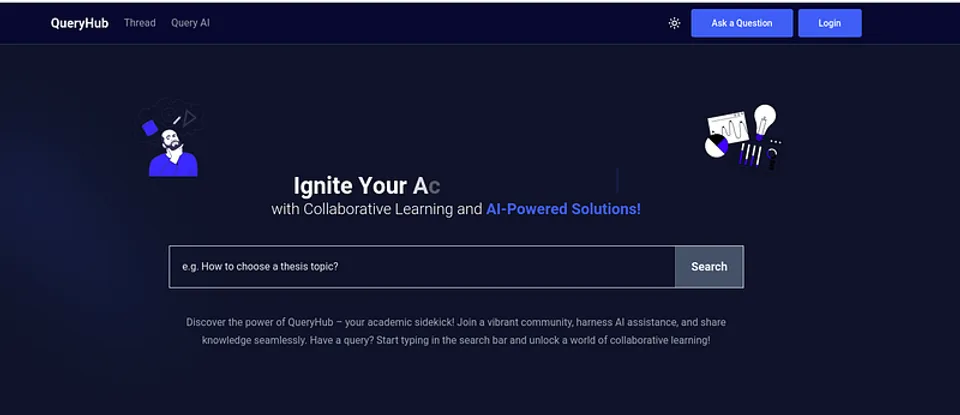
Introducing Queryhub: Revolutionizing Learning with AI-Powered Study Companion
Hello friends and family, brothers and sisters, and the World!!! We’re Introducing Queryhub — Your Ultimate Study Companion!
As students ourselves, we understand the challenges of navigating through vast amounts of academic information. That’s why we’ve created Queryhub, a web application designed to revolutionize the way you learn and collaborate.
Query Forum:
Imagine a platform where students from all universities and departments can come together to ask questions, share knowledge, and find answers. With Queryhub’s AI-powered search, you’ll never struggle to find relevant information again. Can’t find what you’re looking for? Simply create a new question, and let the community provide insightful answers. Upvote, downvote, and verify solutions — it’s a true collaborative learning experience.
Query AI:
For those who prefer diving into PDFs, books, and research papers, Queryhub’s Query AI is here to help. Simply upload your document, and our intelligent chatbot will provide you with concise answers and suggest related questions — making your reading experience more efficient and interactive.
We’re thrilled to have brought this project to life, and we couldn’t have done it without the hard work and dedication of our dedicated team. The pioneers are Arthi Barua, Emdadul Islam, MD. Mehrab Evan, Rafayet Habib, and Tareq Ahmed
Join us on this exciting journey and experience the power of Queryhub! Share your thoughts and let us know how we can continue to improve your learning experience.

> Written by
Emdadul Islam
Software Engineer. View profile →
Read more

How to Deploy an AI Agent with Amazon Bedrock AgentCore
Deploy AI agents with Amazon Bedrock AgentCore for scalable configuration on AWS, integrating with frameworks like LangGraph and CrewAI
How to Add a Native Rich Text Editor in Expo / React Native (No WebView)
Use expo-rte for a native rich text editor in Expo/React Native, offering cross-platform, customizable, native performance without WebView
How to Implement Multi-Factor Authentication (MFA) with TOTP in Your Web Application
Learn to implement Multi-Factor Authentication (MFA) with Time-based One-Time Password (TOTP) in your web application for enhanced security